
Introduction
An efficient and robust network infrastructure is essential for managing secure, reliable, and high-performance network environments. Deploying OPNsense as a virtual machine (VM) on a Dell PowerEdge R730 provides an ideal solution for comprehensive network management, offering advanced firewall, VPN, and network services with flexibility and scalability. This setup significantly enhances control over network security, traffic routing, and service availability.
This setup is particularly valuable for small to medium-sized enterprises, tech enthusiasts, and homelab administrators who require granular control over their network configurations. It enables seamless integration of advanced networking functionalities such as VPNs, DNS management, and detailed monitoring, providing administrators with a powerful, centralized platform for network administration and security.

Descriptions
- OPNsense: A fully-featured, open-source firewall and router platform known for its extensive security tools, advanced VPN options, and customizable reporting capabilities.
- Dell PowerEdge R730: A powerful server platform designed to handle virtualization, network management, and demanding enterprise workloads efficiently.
- WireGuard VPN: A modern, secure, and high-performance VPN protocol ideal for secure remote access and private network configurations.
- ISC DHCPv4/v6: Dynamic Host Configuration Protocol services managing IPv4 and IPv6 addressing, ensuring efficient and automatic IP address assignment within the network.
- Unbound DNS: A validating, recursive, caching DNS resolver providing secure, efficient DNS queries and domain resolution.
- Nginx: A high-performance web server and reverse proxy server used to manage and securely expose self-hosted services.
- Telegraf: A versatile metrics collection agent that gathers detailed system and network metrics, facilitating comprehensive reporting via Grafana.
Process
Deploying OPNsense on a Dell PowerEdge R730 begins by configuring a dedicated VM with VMware ESXi hypervisor. Three distinct Ethernet adapters are assigned to the VM, each serving a specialized purpose: one adapter dedicated to WAN connectivity, another adapter managing LAN connectivity, and the third handling WireGuard VPN traffic. This segmentation ensures clear isolation between public, private, and VPN network traffic, enhancing both performance and security.
After the initial VM deployment, OPNsense is configured with ISC DHCP services for both IPv4 and IPv6 networks. DHCP configurations streamline network management by automating IP address allocation, ensuring devices reliably and efficiently connect to the network without manual intervention.
Unbound DNS is configured next, serving as the authoritative DNS resolver within the network. Unbound’s secure DNS resolution enhances network security by preventing DNS spoofing and cache poisoning, ensuring reliable and rapid domain resolution for internal and external resources.
For secure remote access and inter-network communications, WireGuard VPN is integrated into OPNsense. This setup ensures secure, encrypted communication channels, allowing authorized users and devices to connect safely from external networks, with minimal performance impact due to WireGuard’s efficient protocol.
Additionally, Nginx is deployed to manage and secure access to self-hosted services. Acting as a reverse proxy, Nginx enables secure and efficient delivery of internal applications, providing robust security through SSL termination, load balancing, and detailed access control.
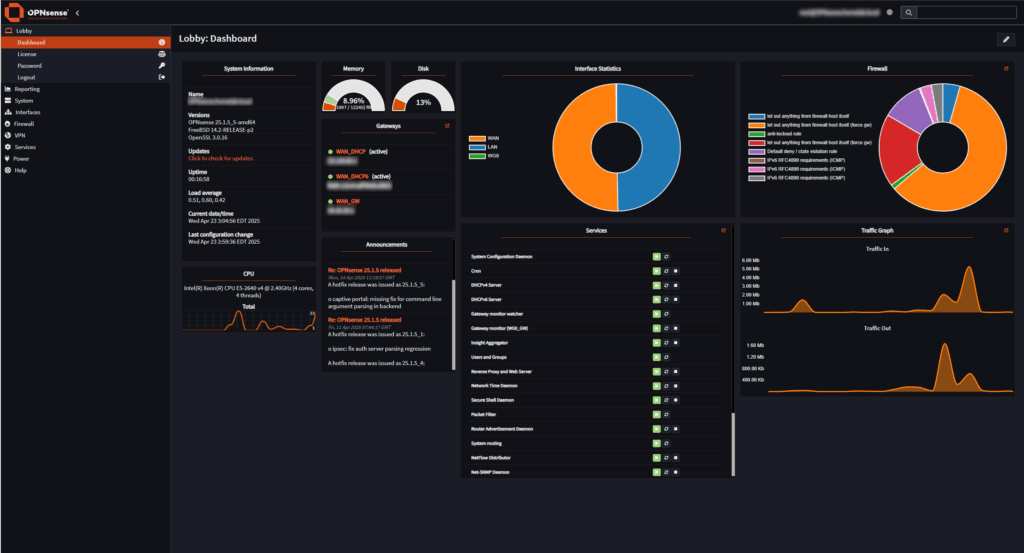
Finally, Telegraf is configured on OPNsense to collect comprehensive system metrics, including network performance data, firewall events, and system resource utilization. This data is forwarded to Grafana, enabling the creation of detailed, real-time dashboards. OPNsense’s built-in reporting capabilities complement this by mapping firewall logs geographically through GeoIP integration, visually highlighting potential threats and network activity on an interactive world map.
Conclusion
Running OPNsense as a VM on a Dell PowerEdge R730, combined with specialized Ethernet adapters, WireGuard VPN, ISC DHCP, Unbound DNS, Nginx reverse proxy, and comprehensive monitoring with Telegraf and Grafana, provides a powerful, secure, and highly manageable networking solution. This integrated setup empowers administrators with detailed insights, advanced security controls, and seamless management capabilities, ideal for robust network environments.